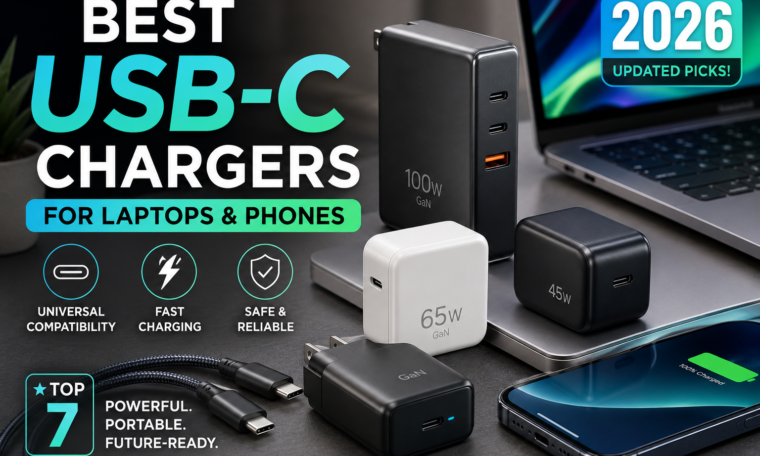
Best USB-C Chargers for Laptops and Phones in 2026
Carrying separate chargers for your laptop, smartphone, tablet and earbuds can quickly turn your backpack into a collection of tangled cables and bulky adapters. Fortunately, USB-C chargers have made it much easier to simplify your setup.
A single high-quality USB-C charger can potentially power a smartphone, tablet and compatible laptop, depending on its wattage and charging standards.
Moreover, modern GaN chargers can deliver high power in surprisingly compact designs. Current charger testing shows that models now range from basic 15W options to powerful 140W chargers, while USB Power Delivery, PPS and GaN technology have become important features to consider.
So, which USB-C charger should you buy in 2026?
The answer depends on your devices, charging speed requirements, number of ports and budget.
What Is a USB-C Charger?
A USB-C charger is a power adapter that uses a USB Type-C port to deliver electricity to compatible devices.
However, USB-C describes the connector, not the charging speed.
That’s an important distinction.
Two USB-C chargers can look almost identical while offering completely different power outputs.
For example, one might deliver 30W, while another can provide 100W or more.
Therefore, always check the charger’s power output and supported charging standards rather than choosing a charger simply because it has a USB-C port.
Why USB-C Chargers Are So Popular in 2026
There are several reasons USB-C charging has become increasingly convenient.
First, USB-C is widely used across smartphones, tablets, laptops, headphones and other electronics.
Second, USB Power Delivery allows compatible devices to negotiate an appropriate charging level.
Additionally, GaN technology has made powerful chargers smaller and more travel-friendly.
Recent testing from Tom’s Hardware found that modern chargers can offer strong efficiency, sustained output and multiple charging protocols, although thermal performance becomes increasingly important at higher power levels.
Consequently, choosing the right charger isn’t simply about buying the charger with the biggest wattage number.
Best USB-C Chargers for Laptops and Phones
Below are some categories and current examples worth considering.
1. UGREEN Nexode 100W USB-C GaN Charger
If you want a high-output charger for both a laptop and smartphone, a 100W GaN charger is an attractive option.
A charger in this class is particularly useful for compatible laptops that require substantial power.
It can also provide plenty of headroom for phones, tablets and accessories.
However, always check your laptop’s maximum USB-C charging requirement before buying.
2. Anker 65W-Class GaN Chargers
A 65W charger is often a practical middle ground.
It can be powerful enough for many thin-and-light laptops while also providing plenty of power for phones and tablets.
Current 65W GaN options are popular because they combine portability with useful output. Indian charger guides also highlight 65W models as a sweet spot for people who want to charge phones, tablets and many ultrabooks with one adapter.
For many users, 65W is the sweet spot between size, price and versatility.
3. Baseus 67W GaN Chargers
If you want something slightly above 65W, a 67W charger can be an interesting choice.
Tom’s Hardware selected the Baseus Enercore 67W as its midrange charger pick after testing it for sustained output and thermal performance.
The advantage of this power class is flexibility.
You can potentially charge a laptop while keeping your phone or another accessory powered, depending on the charger’s port configuration and power-sharing behaviour.
4. Anker 30W USB-C Charger
Not everyone needs a 100W charger.
For a smartphone, smartwatch or other lower-power device, a compact 30W charger may be more practical.
Tom’s Hardware selected Anker’s Nano 3 30W as its low-power pick, citing consistent output, compact dimensions and safety features.
The smaller size also makes this category particularly useful for travel.
5. Ambrane 65W GaN Charger
For Indian buyers looking for a more affordable option, 65W GaN chargers from brands such as Ambrane can be worth considering.
Current Indian listings include 65W and 100W GaN models designed to charge multiple types of devices.
Before purchasing, check the exact port configuration, supported protocols and warranty.
Price alone shouldn’t be the deciding factor when buying a charger.
65W vs 100W USB-C Charger: Which Should You Buy?
This is one of the most common questions.
The answer depends primarily on your laptop.
Choose 65W if:
- You have a thin laptop
- You mainly charge smartphones and tablets
- Portability is important
- You want a relatively affordable charger
- Your laptop officially supports charging around this level
Choose 100W if:
- Your laptop requires more power
- You use a larger productivity laptop
- You want extra power headroom
- You regularly charge multiple devices
- You want one charger for several devices
However, higher wattage doesn’t automatically mean faster charging.
Your device determines how much power it can actually accept.
Therefore, a 100W charger won’t force 100W into a phone that supports only a lower charging level.
What Is GaN Charging Technology?
GaN stands for gallium nitride.
It is a semiconductor material increasingly used in modern chargers.
The biggest benefit for consumers is that GaN technology can help manufacturers create compact chargers capable of delivering substantial power.
That’s why a modern 65W or 100W GaN charger can be considerably smaller than older high-power adapters.
Current charger testing also shows why thermal management remains important: high-output chargers still generate heat, particularly when operating near their maximum capacity for extended periods.
So, while GaN is useful, don’t assume every GaN charger is automatically excellent.
Build quality, safety protections and sustained performance still matter.
What Is USB Power Delivery?
USB Power Delivery, commonly called USB PD, is a charging standard that allows compatible devices and chargers to negotiate power.
This helps one charger support different devices without simply delivering its maximum rated output to everything.
For example, a 100W USB-C PD charger can power a compatible laptop while supplying a lower amount to a smartphone that doesn’t require 100W.
Therefore, when shopping for a versatile charger, USB PD support should be high on your checklist.
What Is PPS?
PPS stands for Programmable Power Supply.
It’s an advanced charging technology supported by some smartphones and chargers.
PPS can allow compatible devices to adjust voltage and current more dynamically.
This can be particularly relevant for certain Android phones that rely on PPS for their fastest supported charging modes.
However, compatibility matters.
A charger supporting PPS doesn’t guarantee maximum-speed charging for every phone.
Always check the charging specifications of your particular smartphone.
How Many USB-C Ports Do You Need?
The number of ports can make a huge difference.
One USB-C Port
Best for:
- One phone
- One laptop
- Travel
- Minimal setups
Two USB-C Ports
Ideal for:
- Phone + laptop
- Phone + tablet
- Two smartphones
Three or More Ports
Useful for:
- Families
- Workstations
- Multiple devices
- Travel setups
However, remember that multi-port chargers usually have a total power limit.
If the charger is rated at 100W, that doesn’t necessarily mean every port can deliver 100W simultaneously.
Don’t Forget the USB-C Cable
Buying a powerful charger but using an unsuitable cable can limit charging performance.
For higher-power laptop charging, choose a USB-C cable rated for the power level you need.
If you’re buying a 100W charger, for example, make sure the cable is appropriately rated for the intended charging power.
Also, some newer USB-C cables support higher power levels and data speeds than basic cables.
Therefore, check the cable specifications instead of assuming that every USB-C cable is identical.
How to Choose the Best USB-C Charger
Before buying, consider these seven factors.
1. Wattage
Choose a charger that meets your device’s requirements.
2. USB PD Support
This is particularly useful for laptops, tablets and many modern phones.
3. PPS
Look for PPS if your compatible phone benefits from it.
4. Number of Ports
Think about how many devices you normally charge simultaneously.
5. Size
GaN chargers are often excellent for travel.
6. Safety Features
Look for reputable manufacturers and appropriate protection against overheating, overcurrent and short circuits.
7. Warranty and Certification
A reliable warranty and recognised safety certification can provide additional peace of mind.
Are Cheap USB-C Chargers Safe?
Price isn’t the only indicator of safety.
Some affordable chargers can work perfectly well, but extremely cheap, unknown-brand products can be a risky choice.
A charger deals directly with mains electricity, so quality matters.
Recent charger testing has emphasised the importance of safety certification, thermal behaviour and sustained output rather than relying only on advertised wattage.
Therefore, buy from reputable brands and trusted retailers whenever possible.
Avoid damaged chargers, loose plugs and visibly frayed cables.
Can One USB-C Charger Charge a Laptop and Phone?
Yes—if both devices support USB-C charging and the charger’s power output is appropriate.
That’s one of the biggest advantages of modern USB-C chargers.
For example, you could potentially carry one 65W or 100W GaN charger for your laptop, smartphone and earbuds instead of carrying three separate adapters.
When multiple devices are connected, however, the charger may distribute its total available power between ports.
As a result, charging speeds can change depending on what else is connected.
Best USB-C Charger by User Type
| User | Recommended Power |
|---|---|
| Smartphone user | 25W–45W |
| Phone + tablet | 45W–65W |
| Thin laptop + phone | 65W–100W |
| Powerful laptop | 100W+ |
| Multiple devices | 100W–140W |
| Travel-focused user | 65W GaN |
These are general guidelines rather than universal requirements.
Your device manufacturer’s charging specifications should always take priority.
Final Thoughts
The best USB-C charger for laptops and phones in 2026 isn’t necessarily the one with the highest wattage.
Instead, look for the right combination of power, charging standards, ports, size, safety and compatibility.
For many people, a 65W GaN charger offers an excellent balance between portability and performance. Meanwhile, users with more demanding laptops may prefer a 100W or higher charger.
If you mainly charge a smartphone, a compact 30W or 45W adapter can be more than enough.
Most importantly, check your device’s requirements before purchasing. Look for USB Power Delivery, consider PPS when relevant, choose a suitable USB-C cable and buy from a reputable manufacturer.
With the right charger, you can replace a pile of bulky adapters with one compact charging solution.
In 2026, USB-C charging is less about carrying more power and more about carrying the right power.