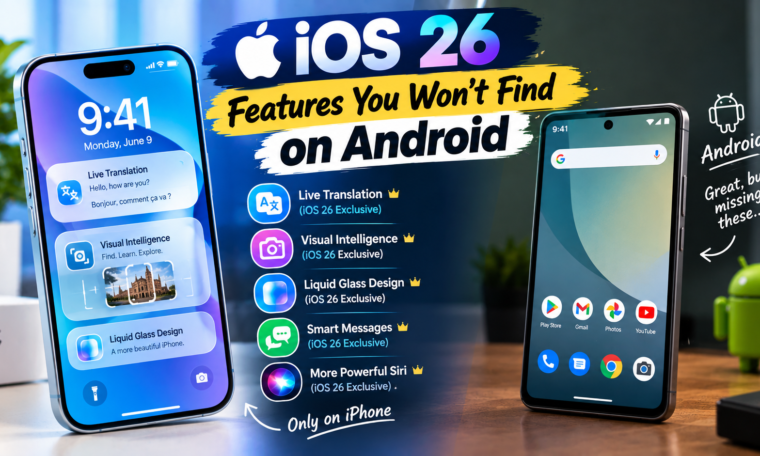
Apple’s iOS 26 introduced a major visual redesign alongside new communication, personalization, and Apple Intelligence features. While Android offers many comparable capabilities, some iOS 26 experiences are closely tied to Apple’s software ecosystem and therefore aren’t available in exactly the same form on Android.
That distinction matters. Saying a feature is “not on Android” does not always mean Android cannot perform a similar task. Android manufacturers and Google’s software can offer comparable functions through different tools. The more precise comparison is about features and experiences that Apple integrates specifically into iOS and its ecosystem.
Apple’s iOS 26 update introduced Liquid Glass, enhanced Lock Screen customization, Call Screening, Hold Assist, changes to Messages and Photos, and deeper Apple Intelligence integration.
1. Liquid Glass System Design
One of the most visible iOS 26 changes is Apple’s Liquid Glass design language.
Apple uses the translucent material throughout system controls, navigation elements, icons, widgets, and other parts of the interface.
Android has its own design language and customization options, but Apple’s Liquid Glass implementation is an iOS-specific system design.
2. Apple’s Integrated Call Screening Experience
iOS 26 introduced Call Screening, which can screen calls from unknown numbers before you answer.
Apple says the feature is designed to help reduce interruptions from unwanted calls.
Android phones can also offer call-screening or spam-protection features, particularly through Google and individual manufacturers.
However, Apple’s implementation is integrated directly into the iOS Phone experience.
3. Hold Assist
Another iOS 26 feature is Hold Assist.
Instead of forcing you to listen to hold music while waiting for a representative, the feature can help keep your place until a live agent is available.
Apple included Hold Assist among the communication improvements introduced with iOS 26.
Android users may have comparable services depending on their phone, region, and carrier, but Apple’s implementation is part of the iPhone’s system software.
4. Apple Intelligence Integration Across iOS
Apple Intelligence became more deeply integrated into iOS 26.
Supported iPhones can use Apple Intelligence for tasks involving writing, image creation, translation, summaries, and other intelligent experiences.
However, Apple Intelligence is not available on every iPhone. Hardware requirements and regional availability affect access.
Apple’s ecosystem approach means these features can also interact with other Apple platforms and devices.
5. Live Translation Across Apple’s Communication Apps
One of the notable iOS 26 capabilities is Live Translation.
Apple supports translation for compatible messages, phone calls, FaceTime conversations, and AirPods experiences.
Apple says Live Translation uses Apple-built models that run on-device for supported experiences.
Android phones also offer powerful translation tools, including Google’s services, so the broader concept is not exclusive to iOS.
The difference is Apple’s specific integration across Phone, Messages, FaceTime, and compatible AirPods.
6. Deep Apple Ecosystem Integration
Some of the strongest iOS experiences become more noticeable when you use multiple Apple devices.
An iPhone can work closely with:
- Mac
- iPad
- Apple Watch
- AirPods
- Apple TV
Features such as AirDrop, Handoff, Continuity, and cross-device experiences are designed around this ecosystem.
Android has its own multi-device ecosystem, particularly through Google and manufacturers such as Samsung.
Therefore, the distinction is less about whether Android has device integration and more about how each company builds its ecosystem.
7. iOS 26 Messages Features
Apple introduced several changes to Messages.
Users can create polls, add backgrounds to conversations, and screen messages from unknown senders.
Android’s messaging ecosystem is different because it involves RCS, Google Messages, and manufacturer software.
Some features may overlap, but Apple’s particular implementation is tied to iOS and Apple’s messaging ecosystem.
8. Lock Screen Personalization
iOS 26 introduced additional Lock Screen customization options, including an adaptive time presentation and spatial scenes.
Apple describes the new design as more expressive and personal while retaining the familiar iPhone experience.
Android has historically provided extensive lock-screen customization, so this is not an area where iOS universally has more flexibility.
Instead, iOS 26 offers Apple’s own approach to personalization.
9. Apple Maps Visited Places
iOS 26 also expanded Apple Maps with features such as Visited Places.
The feature can help users remember locations they have visited, subject to availability by region.
Apple’s feature page notes that some location-related features have regional limitations.
Google Maps provides its own location-history features, so the underlying idea is not exclusive to Apple.
10. Apple Games App
iOS 26 introduced Apple Games, a dedicated destination for games across Apple’s ecosystem.
Apple described it as a new app that gives players a single place to access their games.
Android has Google Play Games and many manufacturer gaming tools, so this is another example where the concept exists elsewhere but Apple’s implementation is specific to its platform.
Why “Not on Android” Needs Context
Technology comparisons can become misleading when they treat similar features as completely unrelated.
For example, iOS may have a feature called one thing while Android offers a similar function through another app.
The better question is:
Does Android provide the same feature, or does iOS provide a different integrated implementation?
This distinction makes comparisons more useful.
iOS 26 Features vs Android Features
| iOS 26 feature | Android equivalent |
|---|---|
| Liquid Glass | Android has its own interface and design systems |
| Call Screening | Available on some Android devices/services |
| Hold Assist | Availability varies by Android device/service |
| Live Translation | Android also offers translation tools |
| Messages polls | Similar functions can exist in Android messaging apps |
| Lock Screen customization | Android offers extensive customization |
| Apple Games | Google Play Games provides a gaming ecosystem |
| Apple ecosystem integration | Android has Google/manufacturer ecosystems |
The comparison shows why a feature may be unique to Apple’s implementation without being completely unavailable on Android.
Final Thoughts
The most interesting iOS 26 features you won’t find on Android are often features tied closely to Apple’s own ecosystem rather than technologies that Android fundamentally cannot provide.
Liquid Glass, Apple’s particular Call Screening and Hold Assist implementation, Live Translation across Apple’s communication apps, Apple Games, and the integration between iPhone and other Apple devices are examples.
At the same time, Android offers many competing or comparable capabilities. Therefore, when comparing iOS and Android, it’s better to examine the exact implementation, supported devices, regions, and software versions rather than simply declaring one platform capable and the other incapable.