AI PCs are becoming one of the biggest trends in personal computing in 2026. Laptop and desktop manufacturers are adding dedicated AI hardware, smarter software, and new productivity features to their latest devices. But with so many products using the term “AI PC,” it can be difficult to understand what actually matters.
An AI PC is generally a computer designed with hardware that can efficiently handle artificial intelligence workloads locally. These systems commonly include a CPU, GPU, and a dedicated neural processing unit (NPU). Together, these components can support AI-powered features while improving efficiency for certain workloads.
However, not every AI feature is equally useful. If you are planning to buy a new laptop in 2026, focusing on practical capabilities is more important than simply choosing a computer because it has an AI label.
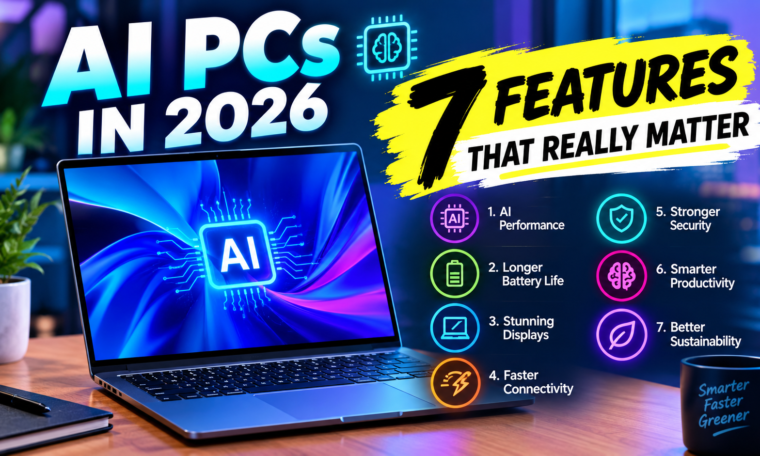
Here are seven AI PC features that really matter in 2026.
1. A Powerful NPU for On-Device AI
The NPU, or Neural Processing Unit, is one of the most important components of an AI PC.
Unlike a traditional CPU, which handles general computing tasks, an NPU is specifically designed to process certain AI and machine-learning workloads efficiently. This can allow compatible applications to perform AI tasks without putting as much pressure on the CPU or GPU.
On-device AI can support features such as background blur during video calls, noise cancellation, image enhancement, live captions, and other AI-assisted functions.
Another advantage is that some AI processing can happen directly on the computer instead of constantly relying on cloud servers.
When comparing AI PCs, therefore, look beyond the words “AI-powered.” Check the capabilities of the NPU and the software that actually supports it.
2. AI-Powered Productivity Tools
AI becomes genuinely useful when it helps you complete everyday tasks faster.
Modern AI PCs can support features that summarize documents, generate text, organize information, improve writing, and assist with repetitive workflows. Depending on the operating system and applications, users may also find AI-powered search, meeting assistance, transcription, and content-generation tools.
Students can use AI tools to organize notes and summarize lengthy material. Professionals may use them to draft documents or analyze information. Creators can benefit from AI-assisted editing and content workflows.
The key factor is integration.
An AI tool that works directly inside the applications you already use can be more convenient than constantly switching between separate websites and services.
3. AI-Enhanced Video Calls
Video meetings have become an everyday part of school, work, and communication. AI PCs can make these calls more convenient through hardware-assisted features.
Depending on the device and software, AI-powered video features may include automatic framing, background effects, eye-contact adjustments, voice isolation, and noise reduction.
These features can help make video calls clearer when you’re working from a busy room or joining a meeting from a less-than-perfect environment.
The NPU can handle some of these tasks efficiently while allowing the CPU to focus on other applications.
For remote workers and students who attend frequent online classes or meetings, AI-enhanced communication can be one of the most practical AI PC features.
4. Better AI Performance for Creative Apps
Content creation is another area where AI PCs can become useful.
Modern photo and video editing applications increasingly use AI for tasks such as object removal, image enhancement, automatic masking, transcription, background separation, and video editing assistance.
A capable AI PC can help compatible applications process some of these workloads more efficiently.
However, buyers should remember that creative performance does not depend only on the NPU. Video editors and 3D creators still need a strong CPU, GPU, sufficient RAM, and fast storage.
For example, a powerful dedicated GPU can remain extremely important for demanding video editing, 3D rendering, and gaming workloads.
Therefore, the best AI PC for creators should offer a balanced combination of CPU, GPU, NPU, memory, and storage.
5. Privacy-Friendly On-Device Processing
Privacy is becoming increasingly important as AI becomes part of everyday computing.
Cloud-based AI services usually require data to travel to remote servers for processing. On-device AI can allow certain tasks to happen directly on the computer.
This doesn’t automatically mean that every AI PC is completely private. Different applications have different data practices, and some AI features still require cloud connectivity.
Nevertheless, local processing can provide an additional privacy advantage for compatible tasks.
Before buying an AI PC, check which features work locally and which require an internet connection. Also review the privacy settings available in the operating system and individual applications.
6. Long Battery Life and Efficient Performance
An AI PC should not simply provide powerful AI capabilities. It should also deliver efficient everyday performance.
Dedicated AI hardware can handle certain workloads using less power than relying entirely on the CPU or GPU. This can potentially help laptops balance performance and battery efficiency during supported AI tasks.
Battery life, however, depends on many factors, including processor architecture, display brightness, battery capacity, software optimization, background applications, and workload.
For laptop buyers, efficiency can be just as important as raw performance.
A lightweight AI laptop that can comfortably last through classes, meetings, browsing, and productivity tasks may be more useful than a powerful machine that requires frequent charging.
7. Long-Term Software and AI Support
Hardware is only part of the AI PC experience.
Software support may determine how useful an AI PC remains several years after purchase. Manufacturers and operating-system developers are continuously adding new AI capabilities, while application developers are creating new features that use local AI hardware.
That means buyers should consider the device’s expected software support, driver updates, operating-system compatibility, and application ecosystem.
A laptop with strong hardware but limited software support may not benefit from future AI improvements as much as expected.
When buying an AI PC in 2026, look for a device that has a clear update path and supports widely adopted AI standards and applications.
AI PC vs Normal PC: What’s the Difference?
The main difference between an AI PC and a conventional PC is the presence of hardware and software designed specifically to accelerate AI workloads.
A traditional computer can still use AI applications through the web or installed software. However, an AI PC may process certain AI tasks locally using its NPU.
Here’s a simple comparison:
| Feature | AI PC | Traditional PC |
|---|---|---|
| Dedicated NPU | Usually included | Not always available |
| On-device AI | Stronger support | More limited depending on hardware |
| AI video effects | Often optimized | May rely more on CPU/GPU |
| AI productivity | More integrated | Often relies on separate applications |
| Local AI processing | Designed for it | Depends on processor |
| Battery efficiency for AI workloads | Can be improved | Varies by hardware |
| Future AI features | Designed for expanding AI support | Depends on compatibility |
Do You Really Need an AI PC in 2026?
Not everyone needs one.
If you mainly browse the internet, watch videos, use social media, write documents, and perform basic tasks, you may not notice a major difference between a capable traditional laptop and an AI PC.
AI PCs become more interesting for people who regularly use AI-powered productivity tools, video conferencing, creative applications, transcription, image editing, or local AI applications.
Students can also benefit from AI-assisted research and productivity tools, although the value depends on how frequently those features are used.
The important thing is to choose a computer based on your workload rather than the marketing label.
What Specifications Should You Check?
When shopping for an AI PC in 2026, consider more than the NPU.
First, check the processor and its overall performance. Next, look at the NPU capabilities if local AI is important to you. For creative work and gaming, pay close attention to the GPU.
RAM also matters. For everyday use, 16GB can provide a comfortable starting point, while demanding workloads may benefit from more memory.
Storage is another consideration. An SSD with sufficient capacity can make application loading and file management much easier.
Finally, check the display, battery capacity, ports, webcam, wireless connectivity, build quality, and software support.
The Future of AI PCs
AI computing is likely to become increasingly common across laptops and desktops. As developers optimize applications for NPUs, more tasks may run locally rather than relying entirely on cloud services.
Future AI PCs could become better at understanding context, organizing information, assisting with creative work, and automating repetitive tasks.
Over time, the question may shift from “Does this PC have AI?” to “What can this PC do with AI, and does it improve my workflow?”
Final Thoughts
The most important AI PC features in 2026 are not flashy marketing claims. A useful AI PC should offer efficient on-device AI processing, practical productivity tools, better video-call features, creative-app support, privacy-conscious local processing, efficient performance, and strong long-term software support.
At the same time, buyers should not ignore traditional computer specifications. CPU performance, GPU power, RAM, storage, battery life, display quality, and software support still matter.
An AI PC makes the most sense when its AI capabilities match the way you actually work. Instead of buying solely because a laptop is labeled “AI,” compare its real features and decide whether they can save you time, improve productivity, or support the tasks you perform every day.