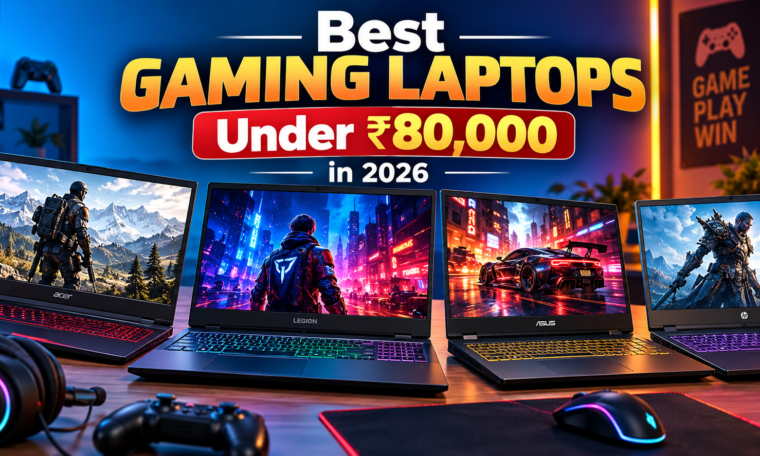
Finding the best gaming laptops under ₹80,000 in 2026 is easier when you know which specifications matter most. This budget offers several options for gamers who want smooth gameplay, dedicated graphics, fast displays, and reliable performance without spending more than ₹80,000. Whether you enjoy competitive games such as Valorant and Counter-Strike 2 or demanding titles such as Cyberpunk 2077 and Forza Horizon 5, choosing the right laptop can improve your gaming experience.
Gaming laptops in this price range commonly feature Intel Core i5 or AMD Ryzen 5 processors, dedicated NVIDIA GeForce RTX graphics, SSD storage, and displays with refresh rates of 144Hz or higher. These specifications make them suitable for gaming, online classes, programming, and everyday tasks, making them some of the best gaming laptops for students in India. However, specifications and prices vary between models, retailers, and configurations. Before buying, compare the graphics card, cooling system, memory, display quality, and upgrade options rather than focusing only on the processor or advertised discount.
This guide explains what to look for when choosing a gaming laptop under ₹80,000 in India in 2026, highlights popular models to compare, and shares practical buying tips to help you get the best value for your money.
Why Choose a Gaming Laptop Under ₹80,000?
A budget of ₹80,000 provides a useful balance between gaming performance and everyday productivity. Many laptops in this category can handle esports games at high frame rates and run numerous modern AAA games at 1080p with appropriate graphics settings. They are also suitable for programming, video editing, college projects, streaming, and general multitasking.
Dedicated graphics are one of the biggest advantages of this price category. A laptop equipped with an NVIDIA GeForce RTX 4050 or RTX 5050, where available within budget, may offer features such as ray tracing, DLSS support, and improved performance in compatible games. Actual performance depends on the laptop’s graphics power limit, cooling design, processor, and memory configuration.
For students and professionals, a gaming laptop can also serve as an all-purpose computer. It provides the processing power needed for demanding applications while remaining portable enough to carry between home, college, and work.
Best Gaming Laptops Under ₹80,000 in 2026
The following models are worth comparing when shopping for a gaming laptop in India. Availability, specifications, and prices can change, so check the exact configuration before purchasing. These are a shortlist of models to investigate rather than a verified ranking of the cheapest offers available today.
1. Lenovo LOQ Gaming Laptop
The Lenovo LOQ series is worth considering for gamers who want a balanced combination of performance, cooling, and upgrade flexibility. Depending on the configuration, LOQ laptops may include Intel Core or AMD Ryzen processors, NVIDIA GeForce RTX graphics, and high-refresh-rate displays.
The dedicated graphics card makes this series suitable for competitive gaming and many graphically demanding titles. Its gaming-oriented design also makes it a practical choice for students who need a machine for both entertainment and productivity.
Best for: Gamers looking for balanced performance and a practical everyday laptop.
What to check: GPU model and power limit, display refresh rate, RAM configuration, battery capacity, and total weight.
2. Acer Nitro V 15
The Acer Nitro V 15 is another popular gaming laptop series in the mid-range market. Depending on the model, it offers Intel Core or AMD Ryzen processors, dedicated NVIDIA GeForce RTX graphics, SSD storage, and high-refresh-rate displays.
This laptop can be a suitable option for players who prioritize gaming performance over a premium, lightweight design. Its specifications make it worth comparing with competing laptops when seasonal discounts bring selected configurations below ₹80,000.
Best for: Esports players and budget-conscious PC gamers.
What to check: Graphics memory, screen brightness, cooling performance, RAM capacity, and the exact GPU included in the listing.
3. ASUS TUF Gaming A15
The ASUS TUF Gaming A15 is worth exploring if durability, gaming performance, and upgrade possibilities are important. Select configurations feature AMD Ryzen processors and NVIDIA GeForce RTX graphics, making them suitable for gaming, content creation, and demanding applications.
The TUF series is designed around a gaming-focused chassis. However, battery life and portability depend on the configuration and workload, so buyers should compare the specifications carefully.
Best for: Gamers who want a versatile laptop for gaming and productivity.
What to check: GPU performance, display colour coverage, cooling, keyboard layout, and available RAM and SSD slots.
4. HP Victus 15
The HP Victus 15 is a practical option for buyers who want a gaming laptop with a relatively understated design. Depending on the version, it may include Intel Core or AMD Ryzen processors, dedicated NVIDIA graphics, and a high-refresh-rate display.
Its design can appeal to users who plan to use the same laptop for gaming, college assignments, office work, and entertainment. The value depends heavily on the GPU and display included in the particular configuration.
Best for: Students and users who prefer a gaming laptop with a simple appearance.
What to check: Graphics card, display refresh rate, brightness, thermal performance, and warranty coverage.
5. MSI Thin 15
The MSI Thin 15 series is worth comparing for users who prefer a relatively slim gaming laptop. Selected configurations offer dedicated NVIDIA GeForce RTX graphics and processors designed to handle gaming and everyday computing.
A thinner chassis can be convenient for carrying a laptop to college or work. However, buyers should not assume that a thinner gaming laptop will deliver the same sustained graphics performance as a thicker model with a more powerful cooling system.
Best for: Users who value portability alongside gaming features.
What to check: GPU wattage, cooling performance, display specifications, battery life, and upgrade options.
Important Specifications to Consider Before Buying
Choosing the right hardware is more important than selecting a laptop based only on its brand name. The following specifications can make a significant difference in gaming performance and long-term usability.
1. Graphics Card
The GPU is one of the most important components in a gaming laptop. It handles graphics rendering and has a major influence on frame rates and visual quality.
Look for a dedicated NVIDIA GeForce RTX GPU. Compare RTX 4050 and RTX 5050 configurations where available, while also considering discounts on older models. Do not assume that a newer GPU will always deliver the best value; performance, power limits, VRAM, and pricing all matter.
2. Processor
A modern Intel Core i5 or AMD Ryzen 5 processor is sufficient for many gaming needs. Some discounted configurations may offer higher-tier processors, but the graphics card usually deserves greater attention when gaming is the primary purpose.
A capable processor also helps with multitasking, video editing, programming, and other demanding applications.
3. RAM and Storage
For a new gaming laptop in 2026, 16GB of RAM is a sensible target. It provides more flexibility for modern games, browsers, voice chat, and background applications than an entry-level 8GB configuration.
A 512GB NVMe SSD is a reasonable starting point. Modern games can occupy substantial storage space, so a 1TB SSD or an upgradeable storage configuration may be preferable for users with large game libraries.
Check whether the laptop has upgradeable memory and whether an additional SSD slot is available.
4. Display and Refresh Rate
A Full HD display with a 144Hz refresh rate or higher is a useful choice for competitive gaming. A faster screen can make motion look smoother, particularly in games where frame rates are high.
Display quality also depends on brightness, colour coverage, response time, and viewing angles. If you edit photos or videos, check colour accuracy rather than focusing exclusively on refresh rate.
5. Cooling and Build Quality
Gaming laptops generate heat during demanding workloads. An effective cooling system helps maintain performance during longer gaming sessions.
Read reviews that examine sustained performance, fan noise, keyboard temperatures, and thermal throttling. Also inspect the hinge, keyboard, trackpad, and chassis quality if possible.
6. Battery Life and Portability
Gaming laptops generally consume more power than ordinary productivity laptops. Battery life can decrease significantly during gaming, so intensive sessions usually require the charger.
If you travel frequently, compare the laptop’s weight, power adapter size, and battery capacity. A lighter design may be more convenient, but it should not come at the expense of the gaming performance you need.
Which Gaming Laptop Is Best for Different Users?
Your ideal laptop depends on how you plan to use it.
- For competitive gaming: Prioritize a strong GPU, high-refresh-rate display, and good cooling.
- For AAA gaming: Compare graphics performance, VRAM, GPU power limits, and support for upscaling technologies.
- For college students: Consider 16GB RAM, a fast SSD, dependable build quality, and reasonable portability.
- For streaming and content creation: Look for a capable processor, sufficient memory, a suitable GPU, and good connectivity.
- For long-term value: Choose a configuration with upgradeable RAM or storage, reliable warranty support, and sufficient graphics performance for your games.
Tips for Getting the Best Deal in 2026
Compare prices across authorized retailers and official brand stores before making a purchase. Seasonal sales, bank discounts, exchange offers, and promotional bundles can change the final price considerably.
Always verify the full model number. Two laptops with similar names can have different processors, graphics cards, display panels, RAM capacities, and cooling systems. Check whether the advertised price includes the configuration you actually want.
Read recent reviews and benchmark tests for the exact model. Look for gaming results at 1080p, sustained performance under load, and temperatures after extended use. Also confirm the warranty, return policy, and availability of service support in your area.
Common Mistakes to Avoid
Do not purchase a gaming laptop based only on its processor name or discount percentage. A powerful CPU paired with a weaker GPU may be less suitable for gaming than a balanced configuration.
Avoid overlooking the display, cooling system, and memory capacity. An 8GB RAM configuration may require an upgrade, while a low-brightness screen can reduce the enjoyment of everyday use. Similarly, a laptop with limited SSD storage may require additional investment soon after purchase.
Finally, do not assume that every laptop under ₹80,000 includes the same RTX graphics card. Check the exact specifications, read independent reviews, and compare the final price before deciding.
Read More: Windows Laptop vs MacBook in 2026: What’s the Difference?
Conclusion
The best gaming laptop under ₹80,000 in 2026 should provide a good balance of graphics performance, processor capability, cooling, display quality, and upgrade options. The Lenovo LOQ, Acer Nitro V 15, ASUS TUF Gaming A15, HP Victus 15, and MSI Thin 15 are useful model families to compare when searching for a suitable configuration.
For most buyers, a dedicated RTX graphics card, 16GB RAM, a 512GB or larger SSD, and a Full HD high-refresh-rate display make a strong starting point. However, the best purchase depends on the exact configuration and current price rather than the model name alone.
Compare recent benchmarks, verify retailer listings, and choose the laptop that meets your gaming requirements without exceeding your budget. A carefully selected gaming laptop can deliver a rewarding experience for gaming, studying, and productivity throughout 2026 and beyond.