Introduction
Why is my phone battery draining so fast? It is one of the most frustrating smartphone problems in 2026. You may start the morning with a full charge, only to see the battery drop dramatically before the day is over.
Modern phones pack powerful processors, bright displays, 5G connectivity, advanced cameras, AI features, and dozens of background services. All of these features can affect battery life. However, rapid battery drain does not always mean that your battery is damaged.
Sometimes, a single app causes the problem. In other cases, screen brightness, location services, weak network signals, background activity, or an aging battery may be responsible.
The good news is that you can often reduce battery drain with a few simple changes. Here are the most common causes and practical 2026 fixes to help your phone last longer.
Why Is My Phone Battery Draining So Fast?
Several factors can cause a phone battery to drain quickly. Heavy app usage is one obvious reason, but hidden background activity can also consume significant power.
Streaming videos, playing games, using GPS navigation, recording videos, and making long video calls can increase power consumption. Meanwhile, apps running in the background may continue syncing data even when you are not actively using them.
A weak cellular signal can also make your phone work harder to maintain a connection. Similarly, high screen brightness and a fast refresh rate can increase energy use.
Before replacing your battery, check your phone’s battery settings. The built-in battery dashboard can often show which apps and features are consuming the most power.
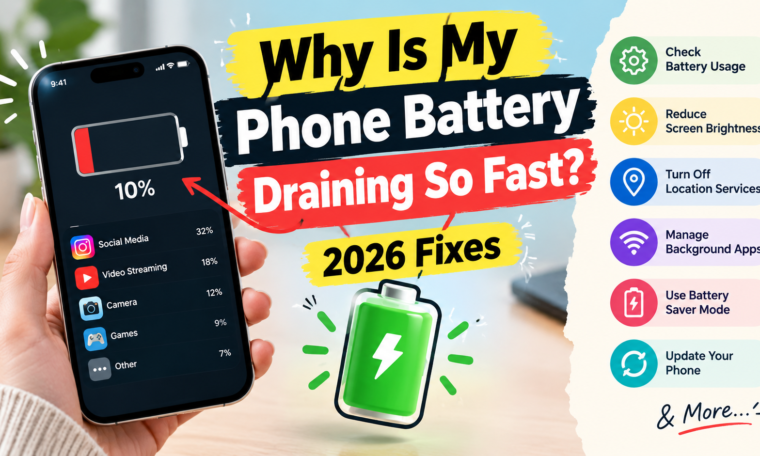
1. Check Battery Usage
Your first step should be identifying what is actually consuming the battery.
Both Android and iPhone devices provide battery usage information. Depending on your model and software version, you can see which apps have used the most energy over a specific period.
Look for an app that consumes an unusually large percentage of your battery.
For example, if a social media app suddenly appears near the top of your battery usage list despite limited use, background activity could be responsible.
Once you identify the problem app, consider updating it, restricting background activity, or reinstalling it.
2. Reduce Screen Brightness
The display is one of the biggest sources of smartphone power consumption.
A very bright screen can drain your battery faster, especially when you use your phone for several hours. High refresh rates can also increase power consumption in certain situations.
Try enabling automatic brightness instead of keeping the display at maximum brightness throughout the day.
You can also reduce the screen timeout period. A shorter timeout prevents the display from staying active when you stop using your phone.
Small display adjustments can make a noticeable difference during heavy daily use.
3. Turn Off Unnecessary Background Activity
Many apps continue working even when you are not actively using them.
Background refresh can allow apps to check for new messages, synchronize content, update feeds, or access other services.
Some background activity is useful, but not every application needs constant access.
Review your background app settings and restrict apps that do not need frequent updates. Avoid disabling essential services blindly, because certain apps may require background access for notifications or other important functions.
4. Check Location Services
GPS and location-based services can consume additional battery power.
Navigation apps naturally require location access while you are using them. However, some apps may request location access even when their location features are not essential.
Open your privacy or location settings and review which apps have access.
Where appropriate, choose options such as While Using the App instead of allowing continuous location access.
This approach can reduce unnecessary location activity without completely disabling useful location features.
5. Manage 5G and Weak Network Signals
5G can provide excellent speeds, but network conditions affect power consumption.
When your phone constantly searches for a stable signal, the cellular modem may work harder. Areas with weak reception can therefore contribute to faster battery drain.
If your phone supports it, check whether automatic network selection or a lower-power connectivity option is available.
You do not necessarily need to disable 5G permanently. Instead, consider using the connection mode that provides a good balance between speed and battery life in your area.
6. Use Battery Saver Mode
Battery Saver or Low Power Mode can help extend battery life when you need your phone to last longer.
These modes typically reduce background activity and limit certain power-intensive functions.
For example, your phone may reduce performance, restrict background synchronization, or adjust display behavior.
Turn on the feature when your battery level becomes low or when you know you will be away from a charger for several hours.
7. Update Your Phone Software
Software updates can sometimes address battery-related bugs and improve system efficiency.
If your phone suddenly begins draining battery after an app or system change, check whether another update is available.
App developers also release updates that fix crashes, background activity problems, and performance issues.
Keeping your operating system and important apps updated can therefore be useful for both security and battery performance.
8. Restart Your Phone
A simple restart can sometimes resolve unusual battery drain.
Background processes occasionally become stuck or behave unexpectedly. Restarting the device can stop those processes and refresh the operating system.
If your battery suddenly starts draining much faster than usual, try restarting before making major changes.
Although this is not a permanent solution for hardware problems, it is a quick troubleshooting step.
9. Watch Out for Power-Hungry Apps
Certain applications naturally consume more energy.
Video streaming, mobile gaming, navigation, video editing, social media, and camera apps can use substantial power because they combine processing, networking, graphics, and display activity.
You do not have to stop using these apps.
Instead, take note of how quickly your battery falls during intensive sessions. If you need longer battery life, reduce the amount of time spent on particularly demanding tasks or lower graphics and streaming quality when practical.
10. Check Battery Health
Battery age matters.
Lithium-ion batteries gradually lose their ability to hold a full charge after repeated charging cycles. As battery capacity decreases, the phone may not last as long between charges.
Apple provides battery health information on supported iPhones. Many Android phones also offer battery diagnostics or health information, although the exact options vary by manufacturer.
If your battery health is significantly degraded, software adjustments may only provide limited improvement.
In that situation, an authorized service provider or the phone manufacturer’s recommended repair service can assess whether battery replacement is appropriate.
11. Avoid Extreme Temperatures
Temperature can affect smartphone battery performance.
Very hot conditions can place additional stress on a lithium-ion battery. Leaving a phone in direct sunlight, inside a hot car, or near a strong heat source can raise its temperature significantly.
Cold conditions can also temporarily reduce battery performance.
Keep your phone within a comfortable operating environment whenever possible. If the device becomes unusually hot during charging or regular use, allow it to cool down instead of continuing intensive activities.
12. Review Notifications
Notifications may seem harmless, but excessive alerts can repeatedly wake your screen and trigger background activity.
Take a few minutes to review notification permissions.
Turn off unnecessary notifications from shopping apps, games, social platforms, and other services that do not require immediate attention.
Besides improving battery life, fewer notifications can make your phone experience less distracting.
13. Disable Features You Do Not Need
Modern smartphones include many convenient features.
Always-on displays, Bluetooth, mobile hotspots, high refresh rates, vibration feedback, and certain connectivity functions can consume additional energy depending on how they are used.
You do not need to turn everything off.
Instead, disable features that you rarely use. For example, turning off a mobile hotspot after finishing a connection prevents unnecessary power consumption.
14. Be Careful With Battery-Draining Accessories
Connected accessories can also affect battery life.
Wireless earbuds, smartwatches, gaming controllers, and other Bluetooth devices require communication with your phone.
The impact varies depending on the device and usage pattern. Still, if your battery suddenly drops faster after connecting a new accessory, check whether that connection is contributing to the change.
15. Avoid Unnecessary Battery-Optimization Apps
Third-party battery-saving apps may promise dramatic improvements.
However, installing another application to constantly monitor or manage your battery can sometimes create additional background activity.
Your phone’s built-in battery management tools are generally a better starting point.
Use the system settings first. Only install third-party utilities when you have a specific reason and trust the developer.
What If Your Phone Battery Is Still Draining Fast?
If you have tried the common fixes and the battery continues to drain unusually quickly, the problem may require deeper troubleshooting.
Start by checking recent app installations and software updates. A problematic app can sometimes cause persistent background activity.
Next, inspect the battery health information available on your device.
Unexpected shutdowns, excessive heat, swelling, or major battery performance changes can indicate a hardware issue. In such cases, avoid attempting to open the phone yourself and seek professional service.
Quick Battery-Saving Checklist for 2026
Use this checklist when your phone battery is dropping too quickly:
- Check battery usage.
- Lower screen brightness.
- Shorten screen timeout.
- Restrict unnecessary background activity.
- Review location permissions.
- Use battery saver mode when needed.
- Update your apps and operating system.
- Restart the phone.
- Reduce heavy gaming and streaming sessions.
- Check battery health.
- Keep the device away from extreme heat.
- Reduce unnecessary notifications.
- Disable unused connectivity features.
- Monitor recently installed apps.
These simple steps can help identify and reduce many common causes of battery drain.
Final Thoughts
A rapidly draining battery does not automatically mean that your smartphone needs replacement. In many cases, the cause comes from an energy-hungry app, bright display, background activity, poor network conditions, or settings that use more power than necessary.
Start by checking your battery usage statistics. From there, adjust screen brightness, background permissions, location access, connectivity, and other settings based on your actual usage.
Battery age should also be considered. If the battery has significantly degraded, replacing it through an appropriate service provider may provide a bigger improvement than changing software settings.
Ultimately, the best way to improve phone battery life in 2026 is to identify what is consuming the most power and make targeted changes. A few small adjustments can help your phone stay charged for longer throughout the day.